Wheeler, Alice
Go to Person RecordCensus Scope
- Year1950
- PlaceTompkins County, Ithaca
- Census ScopeED 49 Sheet 29 #30
- Serial No.V43
Location
- AddressTrumansburg Rd
- Building RecordUnhoused
- LocalityIthaca (Town)
- Institution NameGrand Lodge IOOF Odd Fellows House and Orphanage
- Institution TypeFor Aged Odd Fellows
Household Data
- blankItem 4
Check the box if the response is yes. Note: This information should only be entered once for the family/household. - blankItem 5
Check the box if the response is yes. - Agriculture Questionnaire No.blankItem 6
Enter what you see on the census. If the field is blank on the census, leave it blank on HistoryForge.
Name
- Last NameWheelerItem 7
Names are listed in the following order: Last, First, Middle. If several members of a family have the same last name, the last name will be listed in the first record only and in following records it might be replaced by a line or a blank space. If the name is hard to read, attempt to verify the spelling with the city directory where possible. Note: If you see a last name that looks crossed out because it was written over that line, enter it as the last name. Sometimes the enumerator drew the lines first for the last name of all the people in the household, and then had to write a new last name over the line to indicate a person had a different last name. These were written over the line, not crossed out.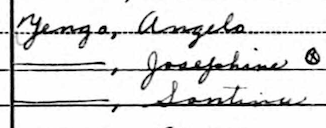
- First NameAliceItem 7
Names are listed in the following order: Last, First, Middle. If several members of a family have the same last name, the last name will be listed in the first record only and in following records it might be replaced by a line or a blank space. If the name is hard to read, attempt to verify the spelling with the city directory where possible. Note: If you see a last name that looks crossed out because it was written over that line, enter it as the last name. Sometimes the enumerator drew the lines first for the last name of all the people in the household, and then had to write a new last name over the line to indicate a person had a different last name. These were written over the line, not crossed out. - Middle NameblankItem 7
Names are listed in the following order: Last, First, Middle. If several members of a family have the same last name, the last name will be listed in the first record only and in following records it might be replaced by a line or a blank space. If the name is hard to read, attempt to verify the spelling with the city directory where possible. Note: If you see a last name that looks crossed out because it was written over that line, enter it as the last name. Sometimes the enumerator drew the lines first for the last name of all the people in the household, and then had to write a new last name over the line to indicate a person had a different last name. These were written over the line, not crossed out. - TitleblankItem 7
Enter a title in HistoryForge only if it is entered on the census sheet. - SuffixblankItem 7
Enter a suffix in HistoryForge only if it is entered on the census sheet.
Relation
- Relation to HeadWifeItem 8
Enter what you see on the census. If this field is blank enter the word Blank so you can save it.
Note: This field has a controlled vocabulary. If, as you enter the term from the census, the term does not appear from the list of controlled vocabulary, enter an X in the field and enter “relation to head is ____” in the notes field.
Personal Description
- Age74Item 11
Enter what you see on the census. If the field is blank, leave blank. If the answer is Un (Unknown) enter 999. For children that are less than one year of age with their birth month listed on the census, skip to the Age (Month) field and select the corresponding birth month on HistoryForge.
Place of Birth & Naturalization
- Place of BirthNew YorkItem 13
Enter what you see on the census. Note: This field has a controlled vocabulary. If, as you enter the term from the census, the term does not appear from the list of controlled vocabulary, enter an X in the field and enter “Place of Birth is ____” in the notes field. - blankThere is no corresponding field on the census. Check the box if the individual was not born in the United States and does not have the designation “AP” under Naturalization.
For Persons 14 Years of Age and Over
- blankItem 16
Check the box if the response is yes. - blankItem 17
Check the box if the response is yes. - blankItem 18
Check the box if the response is yes. - Hours Worked Week Prior to CensusblankItem 19
Enter what you see on the census. If the field is blank on the census, leave it blank on HistoryForge. If the answer is Un (Unknown) enter 999. - OccupationNoneItem 20a
Enter what you see on the census. If the field is blank on the census, leave the default “None.” If, however, the industry is not blank or there is some other indicator of an occupation enter the word “Blank” to indicate that there was an occupation. - IndustryblankItem 20b
Enter what you see on the census. If the field is blank on the census, leave it blank on HistoryForge. - Occupation CodeblankItem C
This is a three-digit occupation code followed by a three-digit industry code and a 1-figure worker class code. The occupation and industry codes are numbers except in the case of unreported occupations and industries which are assigned the code: “VVV.” The worker class code is a number from 1 to 4. If you are unsure, check the resource for verifying the occupation code on the Transcriber’s Corner.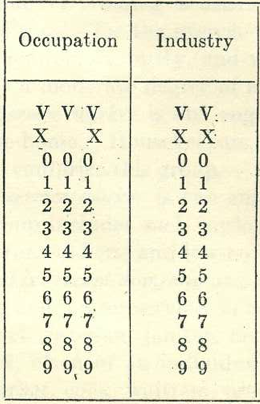
- Industry CodeblankItem C
This is a three-digit occupation code followed by a two-figure industry code and a 1-figure worker class code. The occupation code can contain a “V” or “X” as well as numbers. The industry code can contain a “V” or “X” as well as numbers. The worker class code is a number from 1 to 6. If you are unsure, check the resource for verifying the occupation code on the Transcriber’s Corner. - Worker Class CodeblankItem C
This is a three-digit occupation code followed by a two-figure industry code and a 1-figure worker class code. The occupation code can contain a “V” or “X” as well as numbers. The industry code can contain a “V” or “X” as well as numbers. The worker class code is a number from 1 to 6. If you are unsure, check the resource for verifying the occupation code on the Transcriber’s Corner.
Additional
- Notes
If you find additional or conflicting information about the person such as a different name spelling or address, include the information as written by the enumerator in the relevant field(s) and enter the alternative information here and its source. If you checked the city directory, include the year, i.e., The address in the 1919 City Directory is _______.
*Important - the information in the notes field will become public.
Sample Questions
The following questions pertain to persons whose names appear on the line numbers requiring sample question responses.
Residence 1949
- YesItem 21
Check the box if the response is yes. - blankItem 22
Check the box if the response is yes. - blankItem 23
Check the box if the response is yes. - County or Nearest PlaceblankItem 24a
Enter what you see on the census. If the field is blank on the census, leave it blank on HistoryForge. - State or CountryblankItem 24b
Enter what you see on the census, spelling out any abbreviations. If the field is blank on the census, leave it blank on HistoryForge.
Place of Birth of Father/Mother
- Place of Birth - FatherUnited StatesItem 25a
Enter what you see on the census. Note: This field has a controlled vocabulary. If, as you enter the term from the census, the term does not appear from the list of controlled vocabulary, enter an X in the field and enter “Place of Birth is ____” in the notes field. - Place of Birth - MotherUnited StatesItem 25b
Enter what you see on the census. Note: This field has a controlled vocabulary. If, as you enter the term from the census, the term does not appear from the list of controlled vocabulary, enter an X in the field and enter “Place of Birth is ____” in the notes field.
Education
- blankItem 27
Check the box if the response is yes. - blankCheck the box if the response is yes.
Income for this Person in 1949
- Weeks Seeking Work in 1949blankItem 29
Enter what you see on the census. If the field is blank on the census, leave it blank on HistoryForge. - Weeks Worked in 1949blankItem 30
Enter the number of weeks on the census. If that is blank on the census, leave it blank on HistoryForge. If the field contains 0 (zero) on the census, enter the 0 (zero) on HistoryForge.
Income of Family Members in 1949
For Men
- blankItem 33a
Check the box if the response is yes. - blankItem 33b
Check the box if the response is yes. - blankItem 33c
Check the box if the response is yes.
Additional Sample Questions
The rest of this form pertains to the person whose name appears on the last line requiring sample question responses.
If This Person Worked Last Year
- blankItem 34
Check the box if the response is yes. - Last OccupationblankItem 35a
Enter what you see on the census. If the field is blank on the census, leave it blank on HistoryForge. - Last IndustryblankItem 35b
Enter what you see on the census. If the field is blank on the census, leave it blank on HistoryForge.
If Ever Married
- blankItem 36
Check the box if the response is yes. - Years Since (Last) Married, Widowed, Divorced, or SeparatedblankItem 37
Enter the number of years on the census or check the box for less than one year. - blankCheck the box if the response is yes.
For Women
- No. Children BornblankItem 38
Enter the number of children on the census. If none, leave the field blank on HistoryForge.
Other Family Members
| Name | Sex | Age | Relation | Occupation |
|---|---|---|---|---|
| Borg, Oscar E | Male | 70 | Blank | Fireman |
| Vigelius, Birger | Male | 80 | Blank | Fireman |
| Perkins, Lake W | Male | 72 | Blank | Farmer |
| Anderson, Frank W | Male | 80 | Blank | None |
| Brown, Robert W | Male | 84 | Head | None |
| Brown, Viola | Female | 80 | Wife | None |
| Boughton, Elmer B | Male | 72 | Blank | None |
| Bohne, Bertha E | Female | 80 | Blank | None |
| Banfield, Charles | Male | 78 | Blank | None |
| Carlson, Axel | Male | 79 | Blank | None |
| Cohen, Harry | Male | 66 | Blank | None |
| Cleator, Katy A | Female | 75 | Blank | None |
| Coon, Mabel | Female | 73 | Blank | None |
| DeChambeau, Noah | Male | 85 | Blank | None |
| Darling, Alice | Female | 83 | Blank | None |
| Dickinson, Catherine | Female | 74 | Blank | None |
| Dingman, Edward J | Male | 87 | Blank | None |
| Ford, Edward A | Male | 71 | Head | None |
| Ford, Harriett E | Female | 78 | Wife | None |
| Finkle, Amy | Female | 77 | Blank | None |
| French, Mary M | Female | 80 | Blank | None |
| Ferguson, Emma C | Female | 79 | Blank | None |
| Fenner, George B | Male | 80 | Blank | None |
| Getman, Anna | Female | 69 | Blank | None |
| Hedges, Emogene | Female | 78 | Blank | None |
| Howard, Emily | Female | 83 | Blank | None |
| Harrison, Edward W | Male | 97 | Blank | None |
| Hasbrouck, Ella | Female | 86 | Blank | None |
| Hull, Frank | Female | 83 | Blank | None |
| Julian, Rosetta | Female | 90 | Blank | None |
| Johnson, Nellie | Female | 80 | Blank | None |
| Keefer, Franklin | Male | 80 | Blank | None |
| Kilmer, Charles | Male | 68 | Blank | None |
| Lines, Margaret | Female | 91 | Blank | None |
| Loomis, Estella | Female | 83 | Blank | None |
| McIntyre, Thomas | Male | 87 | Blank | None |
| Mead, Silas | Male | 87 | Blank | None |
| Maughan, Elberta | Female | 74 | Blank | None |
| Post, Julia | Female | 72 | Blank | None |
| Patchin, George B | Male | 82 | Blank | None |
| Rood, Carrie | Female | 87 | Blank | None |
| Rickerson, Earl | Male | 79 | Blank | None |
| Rice, William | Male | 80 | Blank | None |
| Rozell, Sarah G | Female | 89 | Blank | None |
| Robbins, Agatha E | Female | 77 | Blank | None |
| Stanek, Josephine | Female | 78 | Blank | None |
| Smith, John J | Male | 84 | Blank | None |
| Stanton, Earl C | Male | 69 | Blank | None |
| Stroud, Ella | Female | 87 | Blank | None |
| Stilwell, Harriett | Female | 80 | Blank | None |
| Sherman, Rosa | Female | 87 | Blank | None |
| Schutte, Mattie | Female | 77 | Blank | None |
| Schween, Cora E | Female | 81 | Blank | None |
| Smith, Edna | Female | 70 | Blank | None |
| Stein, Jennie | Female | 82 | Blank | None |
| Stubbs, Henry E | Male | 88 | Blank | None |
| Titus, Henry E | Male | 79 | Blank | None |
| Van Tassell, Susie | Female | 69 | Blank | None |
| Wheeler, Wilbur J | Male | 81 | Head | None |
| Wansor, George | Male | 84 | Blank | None |
| Winne, Everett | Male | 80 | Blank | None |
| Izzo, Samuel M | Male | 7 | Blank | None |
| Dauphinee, Jennene | Female | 6 | Blank | None |
| Dauphinee, Norman S | Male | 10 | Blank | None |
| Kinnear, Earl | Male | 53 | Head | Superintendent |
| Kinnear, Amy | Female | 55 | Wife | Matron |
| Brown, Laura | Female | 53 | Blank | Dining Room Girl |
| Wilkin, Robert D | Male | 39 | Blank | Janitor |
| Macomber, Leon | Male | 23 | Blank | Laundry |
| Lavine, Henry | Male | 24 | Blank | Handyman |
| Dunn, Dorothy | Female | 49 | Blank | Housekeeper |
| Dunn, Dewey | Male | 50 | Blank | Farmer Mgr |
| Dean, Herbert P | Male | 57 | Blank | Laundryman |
| Bishop, Irene | Female | 41 | Blank | Maid |
| Howland, Lottie | Female | 49 | Blank | Nurses Aid |
| Minor, Bessie M | Female | 57 | Blank | Cook at Infirmary |
| Swayze, Helen | Female | 35 | Blank | Maid at Orphanage |
| Smith, Eva | Female | 65 | Blank | Cook at Orphanage |
| Meech, Nellie | Female | 65 | Blank | Housemother |